NOTORYX / SARNEG
SARNEG, built into mesh chat
Send grids, frequencies and times as letters only your team can read. The field code that search-and-rescue teams have used for decades, now one tap away in every NOTORYX messaging app.
The first mesh chat apps with SARNEG built in
SARNEG has been around for decades. Search-and-rescue crews, the military and outdoor teams use it to pass grid references and other numbers over radios that anyone can listen to. Until now, though, nobody had built it into a LoRa mesh messenger. Teams had to write the code out on paper, or switch to a separate app, then type the letters back into chat by hand.
NOTORYX changes that. SARNEG is built into the chat of NOTORYX Core, Independent, PRO and Connect, and NOTORYX Ops decodes it. Tap a button, type your numbers and send. On the other end, tap the message to read it. The same code word and the same message format work on both MeshCore and Meshtastic®.
Why we built it
- Mesh channels are easy to overhear. Every radio in range can read a public channel. A private channel's key gets passed around more than anyone means it to. Some numbers shouldn't be sent in plain text: where a lost hiker was last seen, where the team meets, which frequency you're moving to, or how many people are at camp.
- Most of a message isn't secret. The numbers are. "Meet at the trailhead at 1830" gives away little without the time and the grid. SARNEG hides only the digits, so the rest of the message stays readable.
- Teams already know it. Many search-and-rescue and outdoor teams already use SARNEG on handheld radios. They don't need to learn a new procedure, just carry the same word onto the mesh.
- It costs almost nothing on air. A coded message is the same length as the plain one, plus a 9-character
[SARNEG]tag. It needs no new firmware, so any radio and any repeater carries it as ordinary text. - Doing it by hand goes wrong. Swapping digits for letters on paper, in the cold, at night, leads to mistakes. The app does the swap and shows you exactly what will go out before you press Send.
How SARNEG works
- Agree on a code word before the trip. It must have exactly 10 letters, with no letter used twice. BLACKHORSE is the classic textbook example.
- Each letter stands for one digit. The first letter means 0, the second means 1, and so on up to 9.
- To send, swap each digit for its letter. With BLACKHORSE, the grid
17S 4823becomesLRs KSAC. - To read, swap the letters back. Only someone who knows the word can do it.
The NOTORYX message format
- A coded message starts with
[SARNEG], so the receiving app knows to offer "tap to decode". - Digits become capital letters. Every other letter is sent in lower case. That way the "S" in a grid zone can never be mistaken for a digit.
- Spaces and the characters
. - , :go through unchanged, so906.875keeps its decimal point. - The code word is shared as
SARNEG1:WORD, as text or a QR code. Dated words can be added, as inSARNEG1:WORD;2026-12-01=OTHERWORDS, so a team can load a week of words at once.
Try it in your browser
This runs entirely on this page. Nothing you type is sent anywhere. Use a practice word here, never your team's real one.
Goes out as –
Decodes to –
How to use it in NOTORYX, step by step
About 5 minutes. Everyone on the team needs a NOTORYX messaging app. If you're starting from scratch, follow the setup tutorial first.
1 Get an app that has SARNEG
- MeshCore: NOTORYX Core or NOTORYX Independent.
- Meshtastic: NOTORYX Connect.
- Both: NOTORYX PRO.
- Base station: NOTORYX Ops decodes SARNEG on its Channels page.
Use the latest test build. The safeguards on this page need Core rc.15, Connect beta.34, PRO test.31, Independent test.37 or newer, and older builds don't have SARNEG at all. NOTORYX Core Ham doesn't have it either, on purpose (see below).
2 One person sets the code word
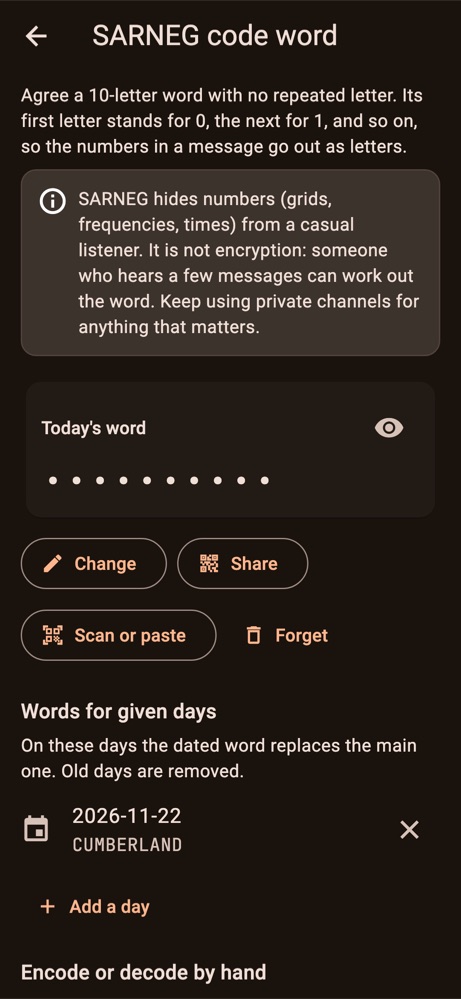
- Open the SARNEG screen. It's under Tools in Core and Connect, Settings in Independent, and the Inbox menu in PRO.
- Tap Type a word. Tap Random word to let the app pick 10 random letters, or type your own: 10 letters with none repeated. The app refuses a word that breaks the rules.
- If you type a word from the public guides, such as BLACKHORSE, the app warns you that anyone can try it. The warning stays on the SARNEG screen until you change the word.
- The word is saved on the phone only, in the Android Keystore or Apple Keychain. It stays hidden until you tap the eye icon (Show the word), and hides itself again after 30 seconds.
3 Share it with the team, face to face
- Tap Share to show the word as a QR code.
- Each teammate opens their own SARNEG screen, taps Scan or paste and scans it.
- One QR code works across every NOTORYX app, whether the teammate uses MeshCore or Meshtastic.
Never send the code word over the mesh, or anyone listening has it too. Share it in person before you head out.
4 Optional: a different word for each day
- On the SARNEG screen, tap Add a day, pick the date and type the word.
- On that day it replaces the main word. Past days are removed automatically.
- Share again after adding words, so the team gets the whole set in one scan.
A message is always decoded with the word for the day it was sent, so yesterday's message still decodes this morning.
5 Send numbers
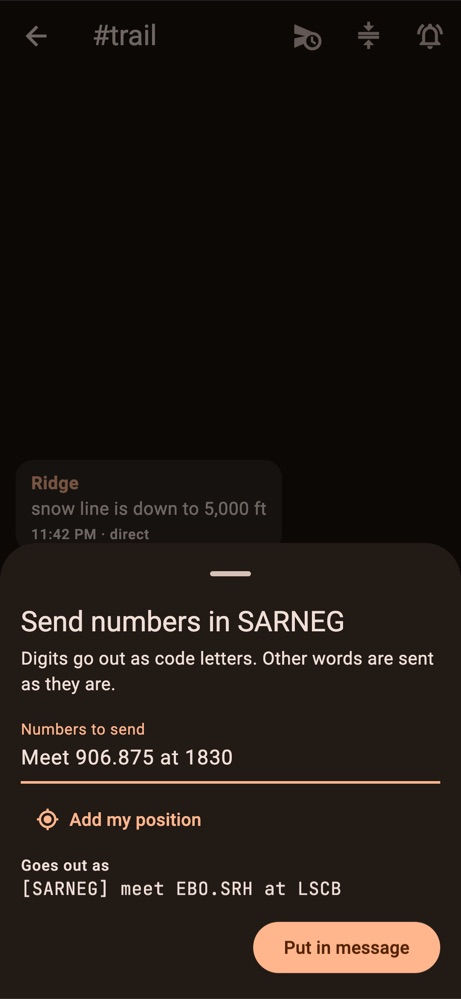
- In any chat, tap the SARNEG button next to the message box. It has a PIN-pad icon.
- Type the message with its numbers, for example
Meet 906.875 at 1830. Tap Add my position to include your phone's position too. - The sheet shows exactly what will go out. Tap Put in message, check it, then press Send. Nothing is sent before you press Send.
6 Read a coded message
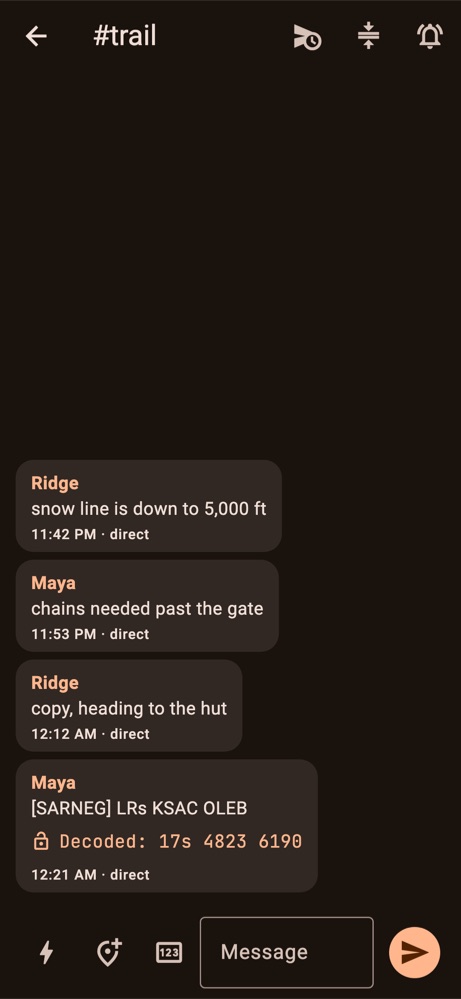
- A message that starts with
[SARNEG]has a SARNEG · tap to decode line under it. - Tap it to see the numbers, decoded on your phone. Tap again to hide them; otherwise they hide themselves after 1 minute.
- If you see "no code word set", tap it to open the SARNEG screen and scan the team's QR code.
Teammates without NOTORYX still receive the message as ordinary text. They just can't decode it.
7 Encode or decode by hand
The SARNEG screen has an Encode or decode by hand box. Use it for numbers you read out over a voice radio, or for letters someone wrote down. It uses today's word.
The box clears itself after 1 minute without typing. If you copy a result, the app clears it from the clipboard after 1 minute, as long as you haven't copied something else since.
Picking and handling a code word
- Never use a word from a guide or a video. BLACKHORSE, AFTERSHOCK, CORNFLAKES, BACKGROUND and CUMBERLAND are in every SARNEG explainer, so anyone can try them. Ten random letters, such as
QZWMXTRKVJ, are far harder to guess. The Random word button makes one for you. - Change it often. Every coded message gives a listener more to work with. A word for each day, or each mission, keeps exposure short.
- Don't code the obvious. If everyone knows the meeting is at "1800", coding it hands a listener four letters of your word.
- Let the safeguards work. The word, decoded numbers and the hand box all hide or clear themselves, and copied text leaves the clipboard after 1 minute. On Android, screenshots, screen recordings and the recent-apps preview of the SARNEG and Scan or paste screens come out black.
- Forget the word when the trip ends. The SARNEG screen has a Forget button that wipes the word and every dated word from the phone.
- Treat the QR code like a key. Don't post a screenshot of it in a group chat.
What it isn't, and where it's not allowed
- SARNEG is not encryption. It swaps one letter for each digit, the same way every time. Someone who collects a few coded messages and guesses one number, such as a time or a grid zone, can work out the word. It keeps numbers from a casual listener, nothing more. For anything that really matters, also use a private channel with its own key, and change the code word often.
- Not on amateur bands. FCC rules (§97.113(a)(4)) forbid amateur messages encoded to hide their meaning. That's why NOTORYX Core Ham has no SARNEG and sends everything in plain text with your call sign.
- Not on GMRS. FCC §95.1733(a)(3) forbids coded messages with a hidden meaning on GMRS too.
- Licence-free LoRa is fine. Normal MeshCore and Meshtastic settings (for example 902–928 MHz in the US, 868 MHz in Europe) carry no such rule in the US. Rules differ between countries, so check yours.
- Not an emergency service. In a real emergency, call your local emergency number first.
SARNEG in NOTORYX Independent